Fragmented activity
Learning, events, assessments, performance and skills information can be harder to interpret when each process is viewed in isolation.
Platform capability / Reporting & Workforce Insight
KnowHow brings learning, events, assessments, performance, skills and related development activity into views tailored to each role that help HR, L&D, managers and leaders understand progress, priorities and development context.
The visibility challenge
When learning, events, assessments, performance, skills and related development activity are viewed separately, teams can struggle to build a clearer picture of progress, gaps, compliance and where attention is needed next.
Learning, events, assessments, performance and skills information can be harder to interpret when each process is viewed in isolation.
Managers and HR/L&D teams need enough context to understand what activity means for a person, role or wider group.
Development priorities become easier to discuss when progress, gaps and activity can be viewed together.
From activity to insight
KnowHow can help organisations move from captured development activity to clearer visibility relevant to each role without separating the learning, performance and skills context.
Learning, event, assessment, performance, skills and related development activity is recorded through the relevant KnowHow processes.
Bring related activity into a connected platform context rather than treating each process as a separate story.
Use views tailored to each role to interpret progress, participation, gaps and development priorities.
Use the insight to support the next conversation, follow-up or development decision.
One organisational view
Reporting & Workforce Insight can bring learning, events, assessments, performance, skills, CPD and related development activity into views tailored to each role so authorised users can interpret what is happening without losing the wider development context.
From dashboard to detail
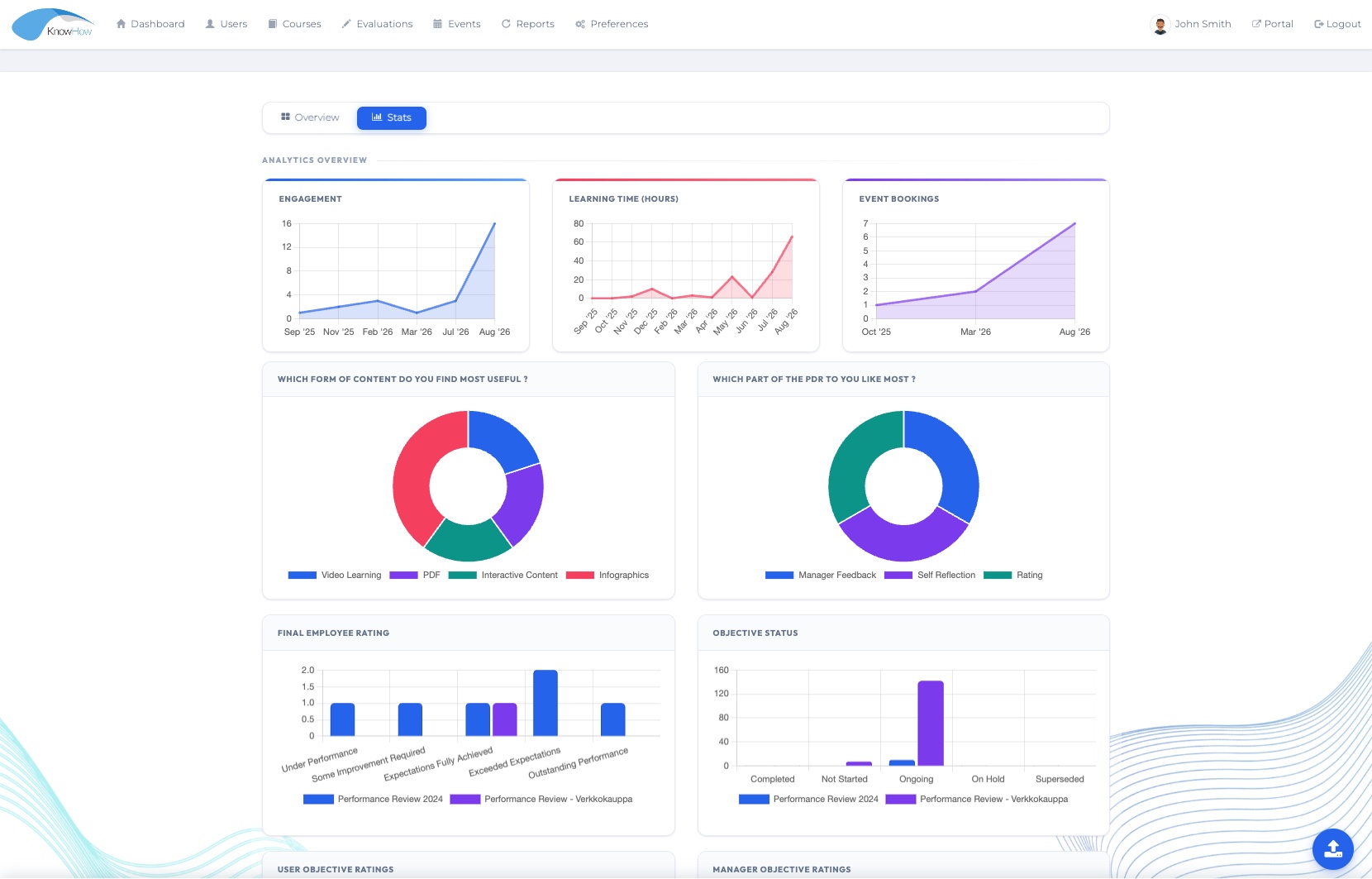
KnowHow combines on-screen dashboards and status views with downloadable reporting and operational controls, helping authorised users move from a high-level picture into the detail needed for follow-up.
Use on-screen views to understand current activity, progress and exceptions without starting from a spreadsheet.
Filter and interpret reporting by configured structures such as manager, team, unit, role and other organisational fields.
Move from visual oversight into feature-specific downloadable reporting when more detailed analysis or evidence is required.
Use operational grids to monitor status, identify outstanding activity and support administrative follow-up.
Where available in the relevant feature, use history, timestamps and exception views to understand what needs attention and what has already occurred.
Reporting API or external BI options can be considered where included in the agreed solution scope and technical design.
Scope-dependentLearning insight
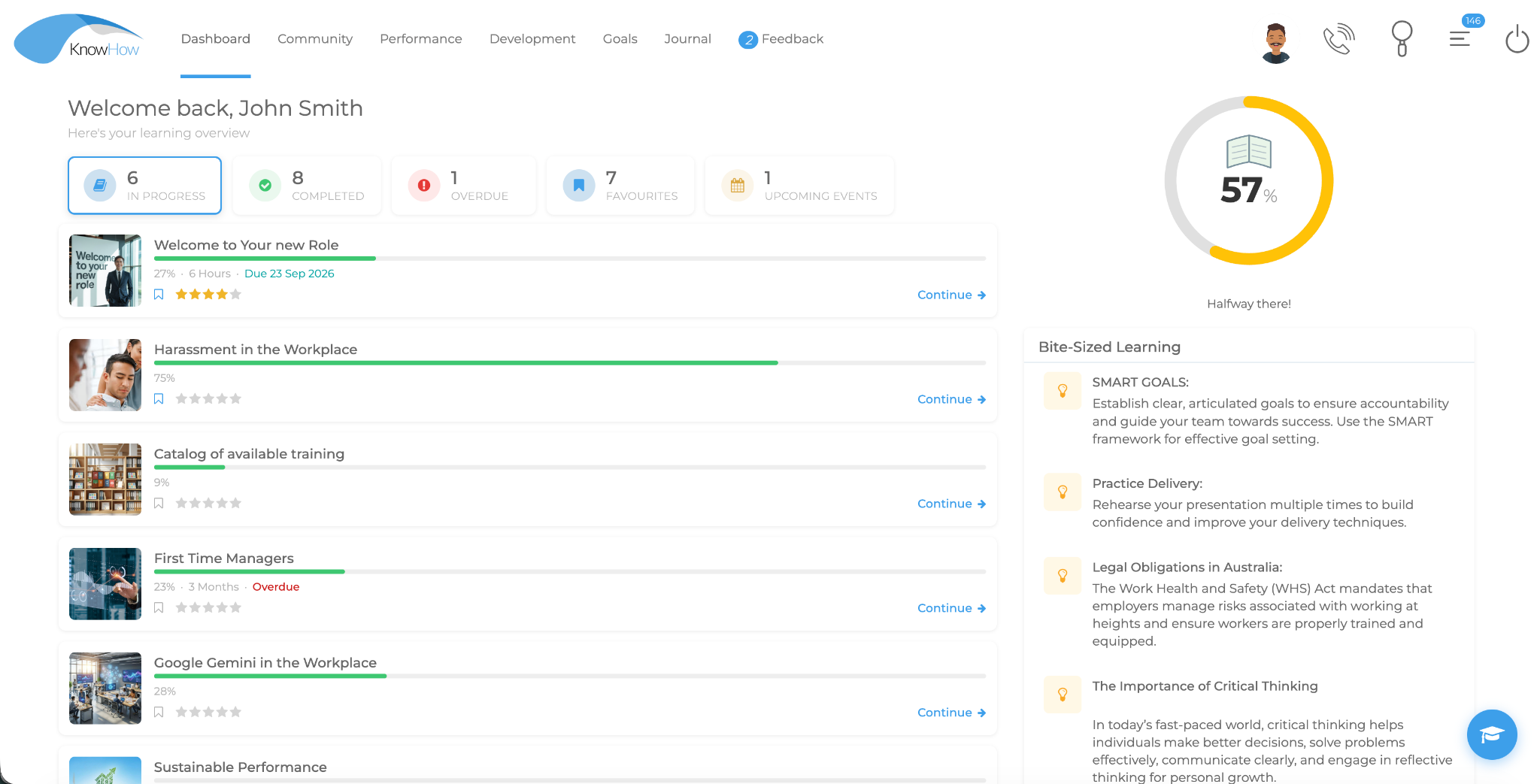
Learning views can help authorised users understand assigned activity, progress, completions, overdue learning, events and wider engagement with the learning experience.
Progress & completionSee how learning activity is moving through the learner journey.
Engagement contextUse learning activity alongside the wider development story rather than as an isolated count.
Role-relevant visibilityPresent the information that matters to the authorised user and their responsibilities.
Course & compliance contextUse course-level progress, completion and required-learning information to support follow-up and evidence where configured.
Performance insight
Performance information can contribute context around objectives, review activity and development conversations, helping organisations see more than learning activity alone.
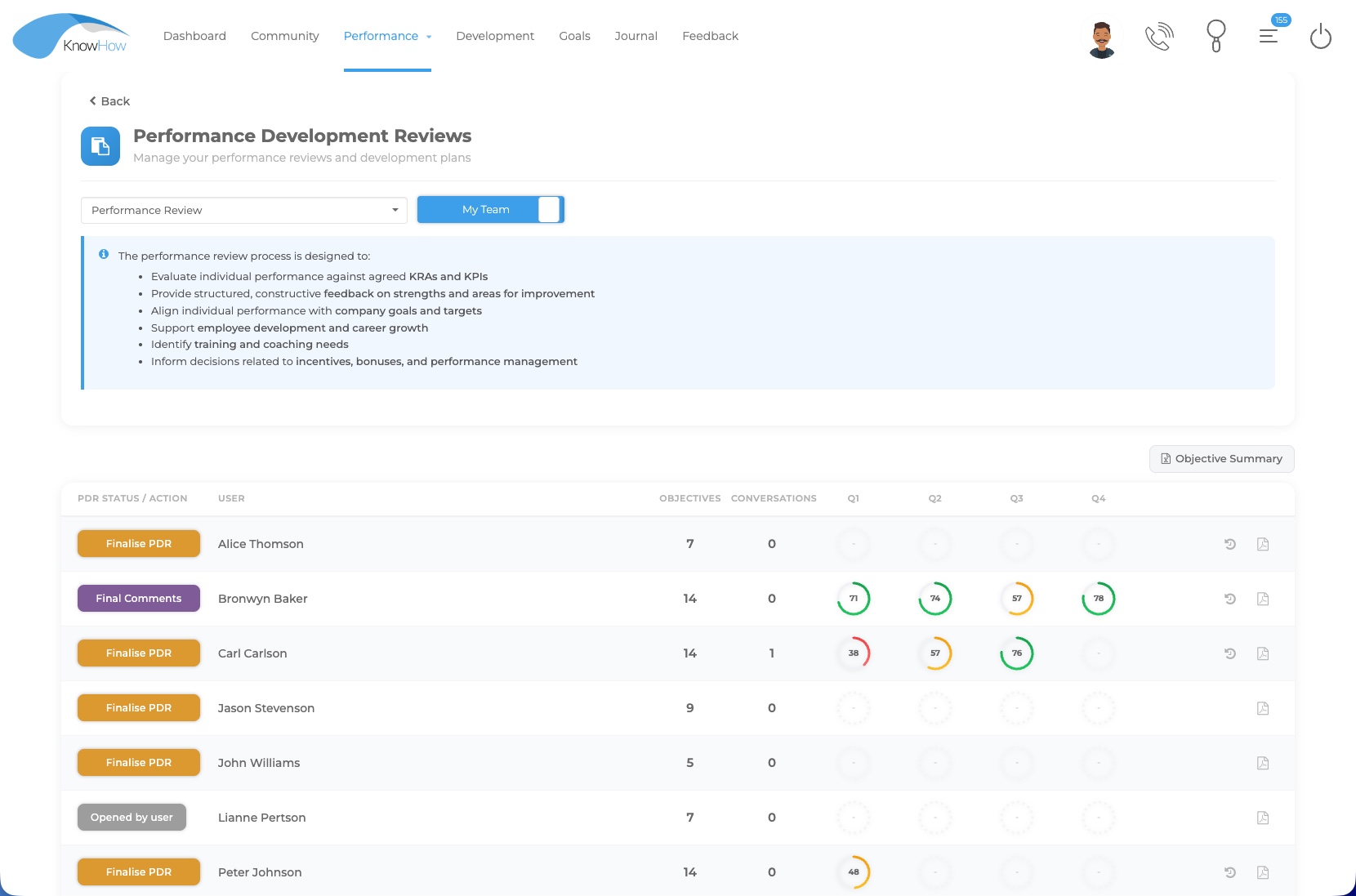
Keep the status of structured review processes visible to authorised users.
Use objective-related activity as part of the wider performance context.
Connect what the performance conversation identifies to subsequent development activity.
Use review status, control grids and available history to support oversight across a performance cycle.
Skills & capability insight
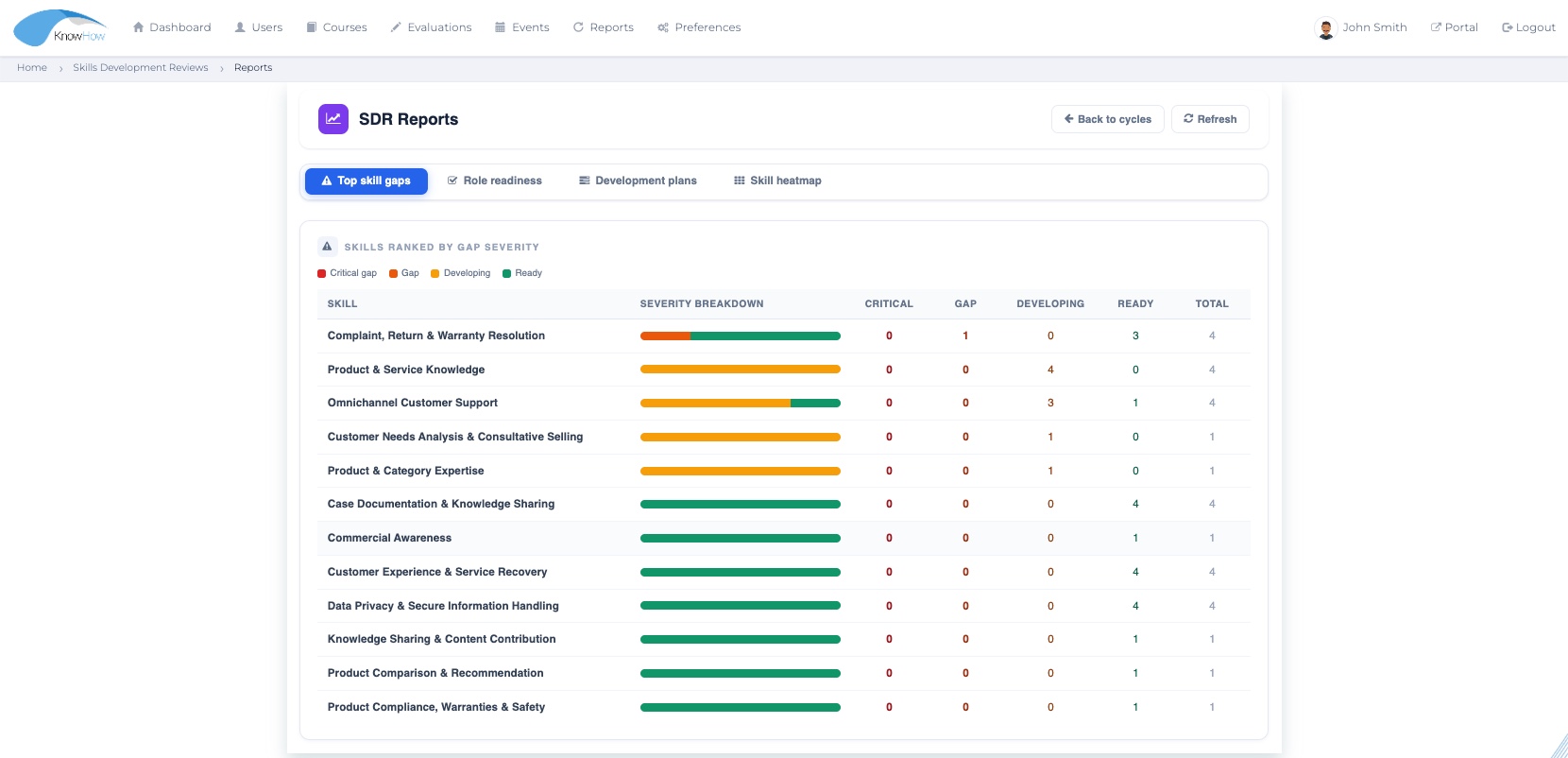
Skills Development reporting can help authorised HR/L&D users interpret gap severity, role readiness and development-plan activity across the configured skills framework.
Reporting across the development lifecycle
The reporting layer can support different operational questions across the wider platform, with the exact views and outputs depending on the enabled features and configured solution.
Assignments, participation, progress, completion, overdue activity and course-level status.
Bookings, attendance and event-related activity for configured live or blended learning.
Scores, attempts, response activity and evaluation outcomes according to the assessment design.
Review status, objectives, ratings, conversations and development follow-through.
Skill gaps, role readiness, development plans and capability priorities.
CPD/Journal activity, certificates and expiry-related information where those processes are enabled.
Different roles, different questions
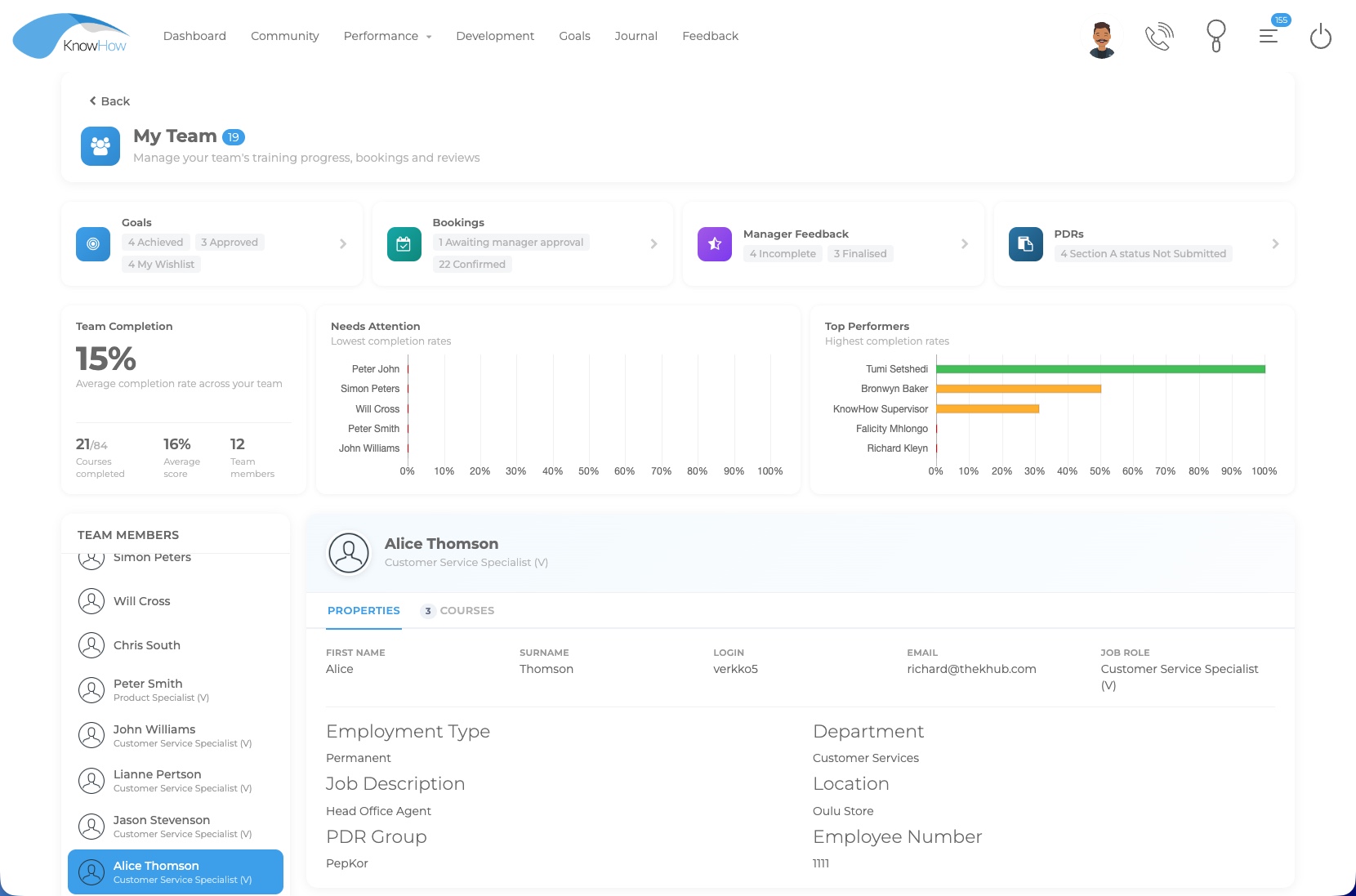
KnowHow uses role-based access and organisational structures so reporting and oversight can be presented in a way that supports the responsibilities of different users.
Personal progress, completion and development context relevant to the individual journey.
Team activity, exceptions, review follow-up and development information relevant to people leadership.
Broader learning, event, performance and capability patterns to support programme and development oversight.
Operational control, status, reporting outputs and follow-up information for the processes they administer.
Higher-level organisational visibility that supports clearer discussion of development priorities.
Configured around organisational context
Reporting & Workforce Insight works best when the underlying platform configuration reflects the organisation’s structures, roles, permissions and development processes.
Use configured organisational structures to narrow the reporting context to the relevant population.
Control who can view the reporting information relevant to their responsibilities.
Use configured role information and organisational fields to support meaningful grouping and filtering.
Use status and control views to identify outstanding activity, exceptions and follow-up requirements.
Use feature-specific downloadable reports when detail needs to be analysed, shared or retained outside the on-screen view.
Reporting API or Power BI/data integration options can be considered where included in the agreed implementation scope.
Reporting is shaped around the capabilities, organisational structures and outputs included in your implementation. Dashboards, exports and integration options are confirmed around your reporting needs.
Insight in context
Reporting & Workforce Insight is the organisational visibility layer of the wider KnowHow platform rather than a disconnected analytics destination.
LEARN
Understand learning participation, progress and activity in the context of the employee journey.
Explore Learning →PERFORM
Bring objectives, reviews and development conversations into the wider organisational picture.
Explore Performance →DEVELOP
Use role requirements and capability gaps to help clarify workforce development priorities.
Explore Skills →Designed for practical visibility
See Reporting & Workforce Insight in your context
We’ll tailor the demonstration around the learning, performance, skills and reporting context that matters to your organisation.